AppLock Go: Gallery Lock1.4.81.0
Publisher Description

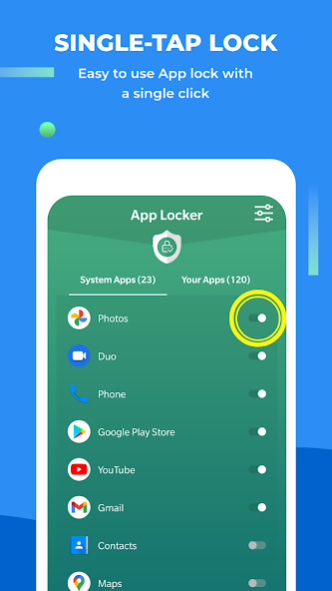
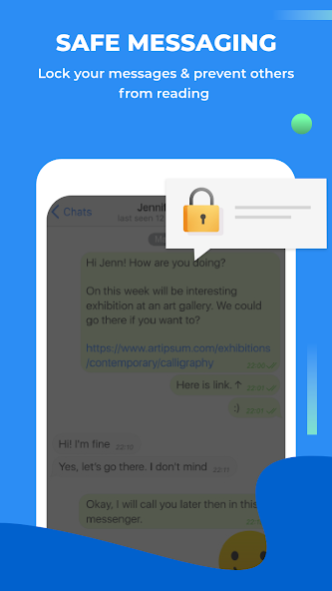
Are there things on your phone that you want to keep private and secure? You need AppLock Go: App lock, security, your secret-keeping app. 🔐 There’s nothing on your phone that this wonderful app CANNOT lock. Lock all or any of the apps on your phone, like Facebook, WhatsApp, Messenger, Instagram, Snapchat, Contacts, SMS, Incoming calls, Gallery, and more! If you’re worried about someone accessing the data on your phone without your consent, then you NEED the AppLock Go app to safeguard everything that’s on your phone.
It could be anything- saved passwords 🔑, private photos 🖼️, notes 📝, work-related information 📓, or more. What’s yours will remain safe.
What makes AppLock Go special?
✨
With AppLock Go, you can protect your apps with a password lock, pattern lock, or fingerprint lock, whichever is most convenient to you. If you wish to keep changing your lock formats, you can do that too. With these locked apps, you can be rest assured that just in case anybody gets hold of your phone, they will not be able to view any data without the PIN, password, or fingerprint that you have set. In simple terms, your phone’s authority remains with you!
AapLock Go makes it easy to lock your picture gallery, screen, and a lot more. 🔑
Features of the App
✨
🛅 Secure your Apps 📌
Your privacy will now stay password-protected with a PIN lock, fingerprint lock, or pattern lock. App lock guards everything that needs protection on your phone, like your pictures, messages, or notes.
🛅Protection from Phone Intruders 🛟
In case your phone is in somebody else’s hands, you can capture their selfie Aap lock allows you to click selfies of intruders who access your protected app.
🛅 Smart Lock ⏲️
You can schedule the time you want the app locked and you can also select when it will auto-unlock on AppLock Go.. You can do this using WIFI or Bluetooth.
🛅 Lock Phone’s Home Screen 📲
With AppLock, you can lock your screen, guaranteeing the privacy of your phone!
🛅 Screen Lock Time 🤳🏻
With app lock, you get a screen lock time feature, preventing the screen from locking on those apps. You fill find this timer in the “settings” section of the app.
🛅 Secure Vault 💎
Hiding files or pictures on your phone is also not difficult using the applock app. All you need to do is transfer those files or photos to the app’s vault. These files or photos will not be visible to anyone in your phone’s gallery or directory.
🛅 Secure Browser 🔐
Aap lock also makes browsing easy with a secure browser feature. But using this browser is no different than any other browser. Only that your search history will now remain private.
🛅 Change App’s Icon 📱
You don’t want people to know that you are using applock on your phone. This is why the app comes with a disguise feature, wherein you can change the app’s icon to a calculator, compass, or recorder.
🛅 Recovery and Backup
It is okay if you forget the app’s password or PIN. Recovering your password on the app takes just a few steps. Enter your email ID and confirm the link sent to your INBOX. Reset your password or PIN, and you’re done. If you don’t wish to use any of these, you can also use the app lock fingerprint.
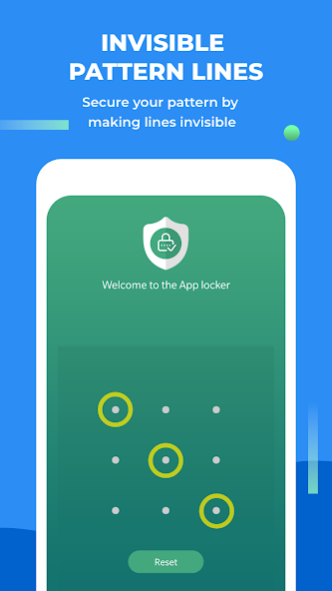
🛅 Invisible Lock Pattern 🔐
Identifying your pattern or PIN that you set using applock has an invisible lock feature. If someone even knows you are using the app, they will still not be able to guess your password.
Additional Features
Besides using app lock just to lock apps, make use of its many additional features that you can use for free. One of them is:
🎳 Play Games- Save more space on your phone by playing games without actually having to install them. There are free games to plan on the app for your entertainment.
Your private data will remain just yours. Install app lock go now! 😀
About AppLock Go: Gallery Lock
The company that develops AppLock Go: Gallery Lock is Appyhigh. The latest version released by its developer is 1.4.81.0.
To install AppLock Go: Gallery Lock on your Android device, just click the green Continue To App button above to start the installation process. The app is listed on our website since 2023-07-21 and was downloaded 7 times. We have already checked if the download link is safe, however for your own protection we recommend that you scan the downloaded app with your antivirus. Your antivirus may detect the AppLock Go: Gallery Lock as malware as malware if the download link to app.locker.fingerprint.applock.lockapps is broken.
How to install AppLock Go: Gallery Lock on your Android device:
- Click on the Continue To App button on our website. This will redirect you to Google Play.
- Once the AppLock Go: Gallery Lock is shown in the Google Play listing of your Android device, you can start its download and installation. Tap on the Install button located below the search bar and to the right of the app icon.
- A pop-up window with the permissions required by AppLock Go: Gallery Lock will be shown. Click on Accept to continue the process.
- AppLock Go: Gallery Lock will be downloaded onto your device, displaying a progress. Once the download completes, the installation will start and you'll get a notification after the installation is finished.
Program Details
System requirements
Download information
Pricing
Version History
version 1.4.76
posted on 2023-07-21
• In App Purchases
• New Home UI
• Bug fixes and performance enhancement
version 1.4.73
posted on 2023-05-12
• New Home UI
• Bug fixes and performance enhancement
version 1.4.39
posted on 2022-05-12
Your applock experience is being upgraded.
Checkout all the new features:
1. Permission Manager: Check and Limit which apps can access your device permissions.
2. Analytics: Track the amount of time you are spending on your phone
Also, some pesky bugs were squashed. Don't forget to share feature requests and feedback with us on support@appyhigh.com
version 1.4.19
posted on 2021-11-12
Bug fixes
version 1.4.16
posted on 2021-07-06
Bug fixes and performance enhancement.
version 1.4.12
posted on 2021-06-03
Minor bug fixes
version 1.4.4
posted on 2021-03-19
version 1.1
posted on 2020-12-07
📸 Improved Intruder Selfie for Android 9.0
🔐 More stable & much better app lock experience
📅 Change app icon to hide the app locker
💯 Performance improved, works better on all devices
✨ UI layout improvements
🆗 Minor bug fixes
👥 Fixed user feedback issues
🚀 Enhanced privacy protection
We keep bringing new updates to Google Play regularly to constantly improve speed, reliability, performance, fix bugs and add new features.
So keep sharing your feedback so we can serve you better!
